
Visual daily planner
See what fits in your day.
Plan tasks on a visual timeline with breathing room between them. Tether helps you see your day and move plans when life changes.
Download on the App StoreCore planning is available free. Calendar sync is a paid feature.
Compare Free, Plus, and Pro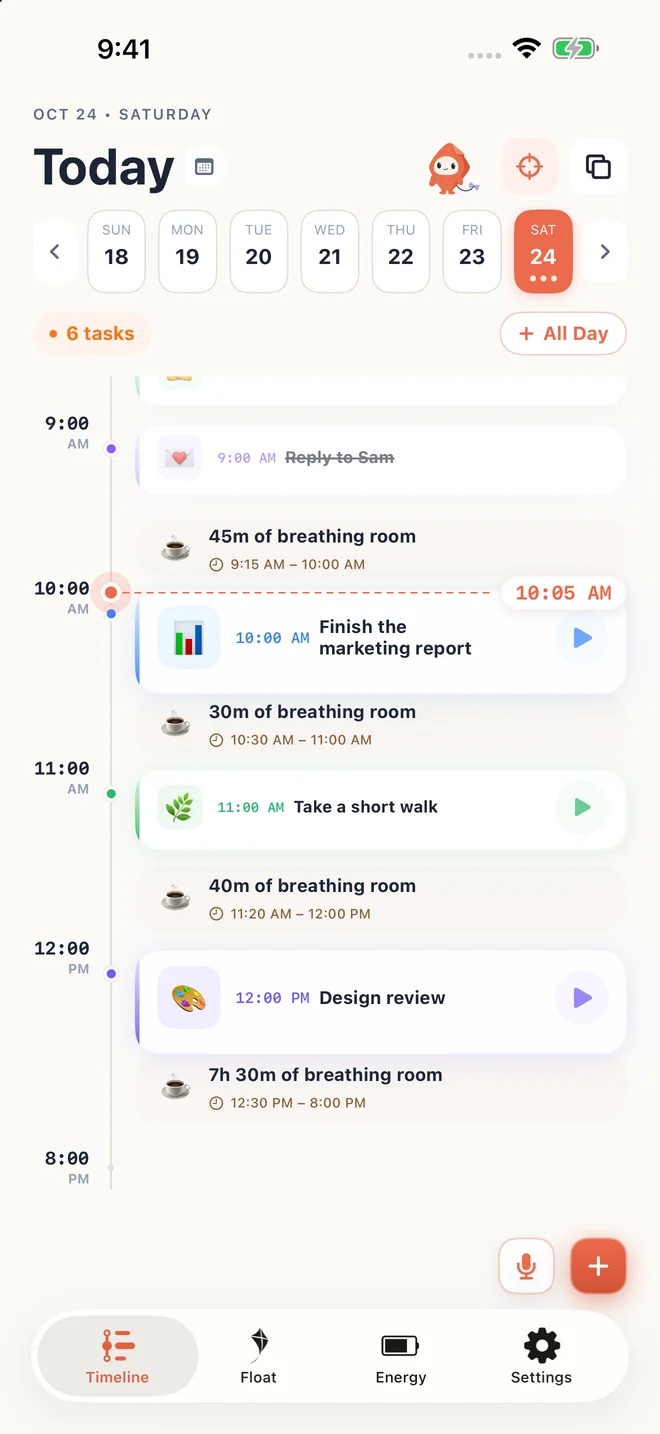
A small example
A report, a meeting, and a walk need different amounts of space. Give each a time block, then leave a gap instead of filling every minute.
Give a list a sense of time
A task list tells you what you want to do. A timeline also shows when you plan to do it. In Tether, tasks occupy blocks alongside the rest of your day, so a long project and a short errand do not look like identical checkboxes.
Leave breathing room
The spaces between planned tasks help you spot room for transitions, a break, or something unexpected. Start with the commitments you already have, add one manageable task, and check the gaps before adding more.
Make a new plan when the day changes
Move tasks to another time, choose another day, or leave them unscheduled in Float. Rescheduling is an adjustment to a plan, not a judgement about how your day went.
Try it in three small steps
- Add one task and choose a realistic duration.
- Place it around your existing commitments.
- Leave a gap, then adjust your plan as the day unfolds.
A few things you might be wondering
Is Tether a to-do list or a calendar?
Tether is a task planner with a visual daily timeline. Tasks can have scheduled times or stay unscheduled in Float. With a paid plan, you can also bring in calendars connected to iOS.
What happens if I miss a task?
You can move it to today or another day, or leave it unscheduled. The planner is designed to let you change the plan without an overdue list dominating the screen.