
Focus with Tiko
One task. A little company.
Start a focus session with a visual countdown and Tiko by your side. Tether Sanctuary keeps the task you chose in view.
Download on the App StoreThe core focus timer is free. Some ambient sounds, themes, and Hyperfocus Guard require Plus or Pro.
Compare Free, Plus, and Pro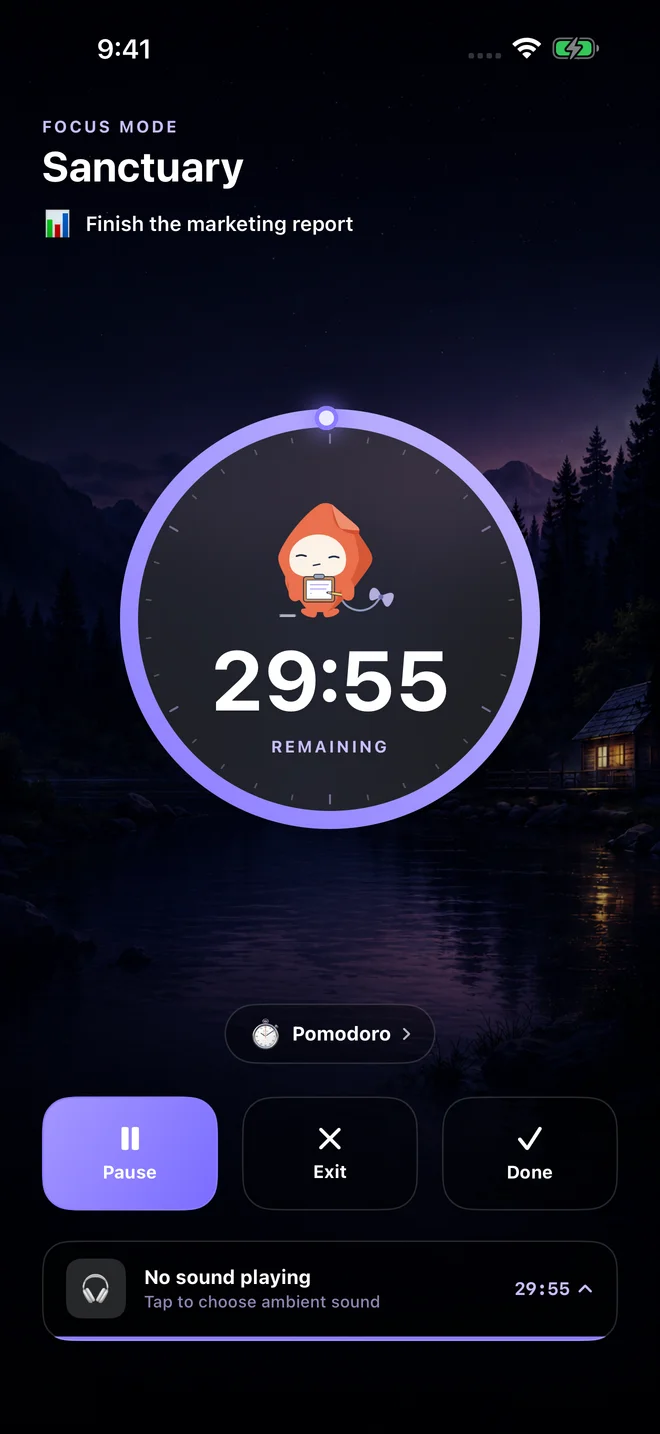
A small example
Choose “Finish the marketing report,” start a short session, and work on opening the draft. Pause if you need to. The whole report does not have to be finished in one sitting.
Give the current task its own space
Sanctuary brings the task you chose into a dedicated focus screen. A visual progress ring shows the remaining session time, with Tiko as an animated companion.
Use a session that fits the work
You can pause, exit, or mark a session done. Tether also offers Pomodoro-style focus and break rounds. Use the structure as a starting point and adjust it to your needs.
Notice when it is time to check in
Optional ambient sounds can accompany a session. Paid Hyperfocus Guard provides configurable check-in reminders. Notification permissions and your device’s Focus settings affect delivery.
Try it in three small steps
- Choose the task you want to work on.
- Start a session and keep the first action small.
- Pause or finish when you need to, then decide what comes next.
A few things you might be wondering
Does Tether have a Pomodoro timer?
Yes. Sanctuary supports Pomodoro-style focus and break rounds as well as a visual countdown for your focus session.
Will the focus timer block other apps?
Sanctuary is a focus screen and timer. It does not currently block social media apps or prevent you from opening another app.